
GETTING STARTED · SETUP & CALIBRATION
Does Auto Bed Leveling Also Set the Z Offset?
Published November 22, 2026 · Manufacturer sources checked November 22, 2026
Sometimes, but not always. Automatic bed leveling and automatic Z-offset adjustment address related problems. A printer may automate both, or measure its printing surface while leaving a nozzle-height adjustment to you.
Before buying your first 3D printer, look beyond the words “auto leveling.” Check whether the exact model also provides automatic nozzle-height or first-layer calibration.
That small distinction can make a difference when you are deciding how much adjustment you want to learn.
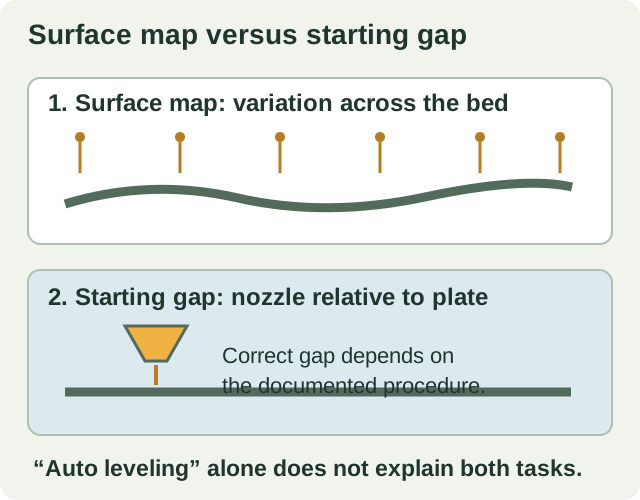
Two questions the printer needs to answer
A filament printer builds an object by placing melted plastic onto a printing surface, usually called the bed or build plate. Getting that first layer right requires more than knowing where the plate is.
Think of two separate questions:
| Question | What addresses it? |
|---|---|
| Does the surface sit slightly higher or lower in different places? | Bed measurement and leveling compensation |
| Is the nozzle starting at the correct distance from that surface? | Nozzle-height calibration, which may involve Z offset |
In common mesh-leveling systems, the printer measures several positions and uses those measurements to compensate as it moves. Marlin’s firmware documentation explains that a first layer consistently too high or too low across the bed can indicate an offset problem rather than a problem with the bed map.
The practical point: measuring the surface and establishing the correct starting gap are related tasks, but an “automatic leveling” label alone does not tell you how both are handled.
If these terms are unfamiliar, keep our plain-English 3D printing glossary handy.
What different automatic systems actually do
Manufacturer instructions give a clearer picture than a feature badge.
FLASHFORGE Adventurer 5M: automatic setup, with documented exceptions
FLASHFORGE describes the Adventurer 5M series as using pressure sensing for full-auto leveling, without routine manual Z-axis calibration. That makes it worth considering if you want to reduce initial nozzle-height adjustment.
However, its support instructions also describe circumstances where further action is needed. FLASHFORGE recommends leveling after nozzle replacement. Its Adventurer 5M FAQ includes a specific adjustment procedure after changing from a textured PEI plate to a smooth PEI plate.
Those instructions qualify the broader marketing message. Automatic initial setup does not mean every future plate or nozzle change is adjustment-free.
Read our FLASHFORGE Adventurer 5M review for the wider ownership considerations.
Original Prusa MK4S: automatic first-layer calibration
Prusa documents a loadcell system on the MK4S that detects the nozzle’s relationship to the steel sheet. Following the initial self-test, first-layer calibration takes place automatically during mesh bed leveling. Prusa says routine manual first-layer calibration using Live Z is unnecessary on this system.
For a buyer, that means one familiar manual setup task is automated. It does not establish that every aspect of printing is automatic.
Our assembled Original Prusa MK4S review also considers assembly, maintenance and workspace needs.
What automatic calibration cannot replace
Even a printer that establishes its own nozzle height needs a suitable printing surface and the correct settings.
Prusa’s troubleshooting guidance identifies surface contamination and material settings among the things that can affect adhesion. It also warns against trying to solve every sticking problem by moving the nozzle closer: an excessively low setting can damage the sheet. Cleaning methods vary with the particular surface.
Before changing offsets, ask:
- Is the correct build plate installed and seated properly?
- Does its surface need cleaning using the manufacturer’s approved method?
- Is the selected printer, plate and material profile correct?
- Has a nozzle or plate change triggered a model-specific calibration requirement?
- Does the printer display an error that its support instructions address?
Use the procedure for your exact model. A paper test or adjustment value shown in a video for another printer may be inappropriate for yours.
Should beginners insist on automatic Z offset?
If your priority is getting started with fewer manual adjustments, documented automatic first-layer calibration is a useful feature to prioritize.
If learning mechanical setup is part of the hobby you want, a printer with a documented manual adjustment process may still fit your plans. Read that process before purchasing so you understand the work involved.
For workplace use, consider who will operate the printer and how instructions will be handed over between people. A clearly documented routine matters alongside the amount of automation.
Our first-printer buying guide helps you weigh setup against your projects and workspace.
Five questions to check before buying
- Does the manufacturer explicitly document automatic Z offset or first-layer calibration?
- What does the operator do during the first setup?
- What must happen after changing the nozzle or build plate?
- Are the instructions for this exact model and hardware revision?
- Is troubleshooting explained clearly enough for you to follow?
You do not need to become a calibration expert before choosing a printer. You do need to know which tasks the machine performs and which ones remain yours.
Use our printer comparison to read the calibration notes across models, or try the Printer Finder to narrow the options around your intended projects.
This article explains documented manufacturer features. It is research-based guidance, not a report of hands-on testing.