
Workplace · RESEARCH REVIEW
ELEGOO Centauri Carbon 2 Combo review
An enclosed color option for a dedicated home or office workspace, subject to the exact material and ventilation requirements.
Check Price on AmazonWe may earn a commission. Check the selected model and current price on Amazon.
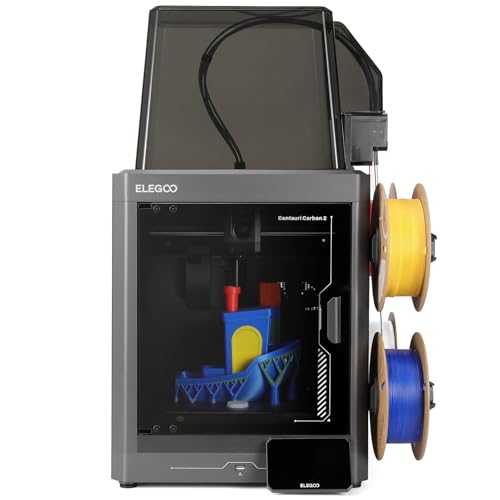 Product image from Amazon.
THE OWNERSHIP PICTURE
Printer at a glance
What the researched ELEGOO Centauri Carbon 2 Combo package offers, and what it asks of you. These are descriptive assessments, not customer ratings or hands-on test scores.
- Best suited for
- Enclosed workshop color projects
An editorial project-fit assessment based on the documented package and build space.
- Experience needed
- Experience level not yet assessed
Setup features alone do not establish beginner suitability. Read the assembly, software and maintenance requirements for this exact package.
- Setup & calibration
- Automatic bed / first-layer setup
The documented system helps measure the bed or establish the first layer. Cleaning, adhesion checks and occasional troubleshooting still need an operator.
- Workspace
- Enclosed printing area
The body surrounds the printing area. This does not establish a child-safe interlock or acceptable room exposure.
- Materials
- Flexible filament, with restrictions
Compatibility is conditional on the correct nozzle, feeder, enclosure and material profile. Check the exact material notes below; inclusion here is not an unrestricted compatibility promise.
- Color & printing workflow
- Automatic color hardware included
The researched package includes automatic color equipment. Changes can add printing time, waste and feeder maintenance; not every supported filament works in the feeder.
- Children & families
- Child-use suitability not confirmed
No completed exact-model child-use assessment is available. This product is excluded from kids filters unless the manufacturer explicitly designates the exact model for children.
- Ownership demands
- Printer and color-feeder upkeep
Inspect feeding components for abrasion. Keep grille, fans and nozzle clear.
Choose this printer if…
You need an enclosed color workflow and will validate each material profile.
Consider another printer if…
You assume the hotend temperature alone proves compatibility with every engineering polymer.
What you’ll need besides the printer
Compatible filament and spools for the included feed system, suitable storage, cleaning supplies and a budget for purge material, replacement cutters and nozzles. Budget for failed attempts, electricity and your preparation time as well.
Labels interpret the existing exact-model research, checked 2026-11-18. Manufacturer reference · Supporting reference 2 · Full specifications and restrictions · All sources and limitations
THE PRACTICAL VIEW
Who should consider it?
A more contained home or dedicated-office option than the open Centauri 2 Combo, subject to material and room ventilation checks.
Strengths
- Enclosure compared with open Centauri 2
- Four-color workflow
- Automatic setup and monitoring
Trade-offs
- Color waste and feeder complexity
- TPU needs workflow change
- Enclosure is not proof of industrial certification
IN EVERYDAY USE
An enclosure changes the setup, not every rule
This Centauri Carbon 2 Combo is a different purchase from the open Centauri 2 Combo. Its more contained arrangement may appeal in a dedicated home workshop, but it does not remove the need to assess the room or materials. The documented 256 mm printing cube is about ten inches across. If your objects are smaller than that, focus on loading, maintenance and the way the selected material is supported instead of assuming a hotter nozzle will automatically improve your results.
Does Centauri Carbon 2 Combo handle every plastic the same way?
No. TPU has a separate adapter and CANVAS-disconnection requirement in the manufacturer notes. Abrasive materials also bring wear considerations. A broad temperature claim does not establish that every high-temperature plastic is suitable. Match one intended material to the exact printer and feeder instructions before planning a purchase around it.
Project examples are buying guidance, not hands-on test results. New to the terminology? Read the plain-English glossary.
For beginners & families
Beginner suitability not yet assessed
We have not completed an experience-level assessment for this exact model. Automatic calibration alone does not establish how easy the full workflow is to learn.
Child-use suitability not verified
No verified child-use recommendation or minimum age has been established for this exact listing. Check the current manufacturer manual before buying for a child. We do not infer child suitability from a listing’s “kids” wording, an enclosure or automatic calibration.
Experience labels are our editorial assessment of documented setup and maintenance, not a safety certification. Family buying guide
SEE IT IN ACTION
Watch before you choose
Setup demonstrations and creator perspectives to help you picture this printer in your workspace. Video prices, firmware and accessories may differ from today’s offer.
Manufacturer video · Elegoo Official
Unboxing Elegoo Centauri Carbon 2 Combo! | Unboxing & Set Up
Manufacturer setup or product demonstration for Centauri Carbon 2 Combo. Follow the current exact-model manual alongside the video.
YouTube loads only when you choose. Loading connects to YouTube / Google, which can receive your IP address and browser information and use storage under their policies.
Published by the manufacturer or its support channel. This is promotional or instructional material, not an independent review. Source
Creator video · FauxHammer
Elegoo Centauri Carbon 2 Combo Review - Cheap at What Cost?
A creator’s perspective on Centauri Carbon 2 Combo. Their experiences and opinions are not our hands-on test results.
YouTube loads only when you choose. Loading connects to YouTube / Google, which can receive your IP address and browser information and use storage under their policies.
The creator discloses a free printer, supplied filament and affiliate links; the description states no payment or editorial oversight. Source
Selection checks use the original uploader’s title, description and current embedding availability, not a full viewing or verification of every claim. Videos belong to their respective creators. Inclusion does not imply their endorsement of this website. Our written assessment remains separate from the videos.
The specifications, explained
Build volume means the space available for your object, not the size of the machine. A speed ceiling is a maximum claim, not a finished-print time. Calibration describes setup checks, some of which may still need your help. Look up unfamiliar terms. Manufacturer claims are not independent performance measurements; unverified fields stay labeled.
- Build volume
- 256 × 256 × 256 mm
- Maximum speed
- 500 mm/s advertised CoreXY velocity; not a measured print benchmark.
- Calibration
- Full-auto calibration.
- Materials
- 350°C nozzle advertised. TPU needs an adapter and CANVAS disconnection; abrasive feed materials need wear checks. Do not infer every high-temperature polymer is suitable.
- Color options
- Four-color CANVAS workflow; chassis color choices not independently verified.
- Experience level
- Not independently verified
- Children & supervision
- Child-use suitability not verified
When an enclosure helps
A contained print area may be preferable on a dedicated workbench where drafts and access are concerns. It is not a reason to put a printer in a bedroom or assume emissions are harmless. Choose the room and operating procedure as carefully as the hardware.
Evaluate the whole workflow
For colorful display models, compare a representative sliced project including its supports and waste. For business fixtures, qualify material properties and repeatability instead of selecting by color count. If you mainly need one-color prototypes, compare the base Carbon 2 as well before paying for a feeder.
Cost of use & everyday ownership
Plan purge waste, feed-component replacement and material drying. The low-noise claim uses a specific silent-mode laboratory condition, not every job.
Maintenance
Inspect feeding components for abrasion. Keep grille, fans and nozzle clear.
What owners report
Several users on ELEGOO's official GitHub tracker describe the local camera feed stopping while the printer stays operational. The discussion later reports normal camera operation after official firmware 02.01.01.13 on November 10, 2026, although that short observation is not a long-term fix verification. Check firmware before treating older camera complaints as current behavior. Do not transfer this evidence to the open-frame Centauri 2.
Multiple users in one official issue, with a subsequent firmware improvement report. Support posts are a selective sample, not a reliability survey.
Customer-feedback sourceSafety, warranty & support
Enclosed chamber with smart grille. Manufacturer lists clog/runout/cutter/grille/fan checks among 31 sensors. No exposure-control certification established.
Warranty details
ELEGOO new-machine policy generally 12 months, with component exclusions or limited terms and authorized proof of purchase; local rights may extend coverage.
Read the workspace safety guide before installation. An enclosure or filter does not by itself prove a printer is safe for an occupied room.
Sources & research notes
This is a research-based assessment. No hands-on testing, measured print quality or verified long-term reliability is implied.
- Official Carbon 2 Combo specifications and warranty
- Official Carbon 2 manual
- Exact Amazon selection (listing identification only)
- Official Centauri Carbon 2 camera issue and firmware follow-up
Observed Amazon prices and availability are maintained in the private research record. Public pages direct you to Amazon for the current offer.
The decision
An enclosed color option for a dedicated home or office workspace, subject to the exact material and ventilation requirements.
Check Price on Amazon